
Keep Your Incognito History Private with Auto-Delete
Want the convenience of incognito history without keeping it forever? Set it to delete itself when your last incognito window closes, or after a set number of days.
June 7, 2026
Keeping an incognito history is genuinely useful, right up until you start wondering how long it’s piling up. The whole appeal of incognito is that it doesn’t linger. So if you’re going to keep a history at all, you want it on a leash.
Incognito Reopen & History gives you exactly that: the convenience of reopening tabs and browsing your history, with auto-delete rules that keep it from outstaying its welcome.
Choose when it disappears
Open the extension and you’ll find an Auto-delete setting with three modes:
- Never: keep your closed tabs and history until you clear them yourself. This is the default.
- When all incognito windows close: the moment your last incognito window shuts, everything is wiped. This is the closest match to how incognito already behaves, useful while you’re browsing and gone the instant you’re done.
- Older than N days: keep a rolling window of recent activity and let anything older fall away automatically. You can pick 1, 2, 3, 5, 7, 14, or 30 days.
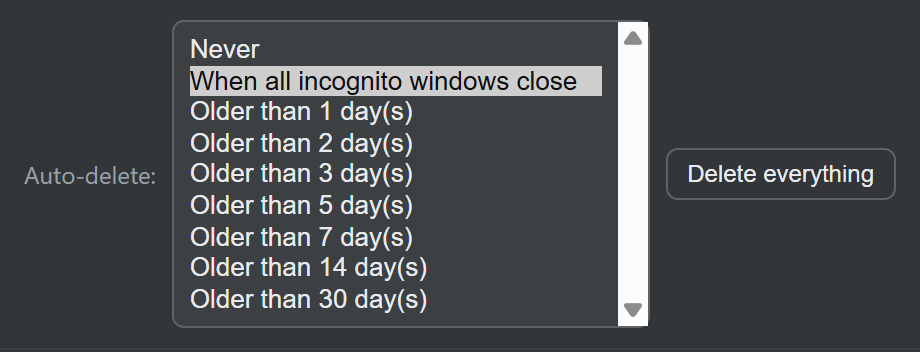
Your choice is remembered and applied automatically. Set it once and forget about it.
Or clear it yourself, instantly
Auto-delete runs in the background, but you’re never locked into waiting for it. At any time you can:
- Delete a single entry: hover over any row and click the trash icon.
- Clear just your closed tabs or just your full history, independently.
- Use Delete everything to wipe both lists in one click.
It was never leaving your device anyway
Auto-delete is about tidiness and peace of mind, not damage control. Your incognito data never leaves your computer in the first place. Everything is stored in your browser’s local storage, with no account and no server behind it. Auto-delete simply means even you won’t find it lying around later.
New to keeping an incognito history? Start with how to see your incognito browsing history, or read does incognito mode save history? for what Chrome stores on its own.
Install Incognito Reopen & History and keep your incognito history for exactly as long as you want, no longer. It’s free.